

The Dashboard
Your books, their beta rounds, your promotions and the shortcuts to everything else.
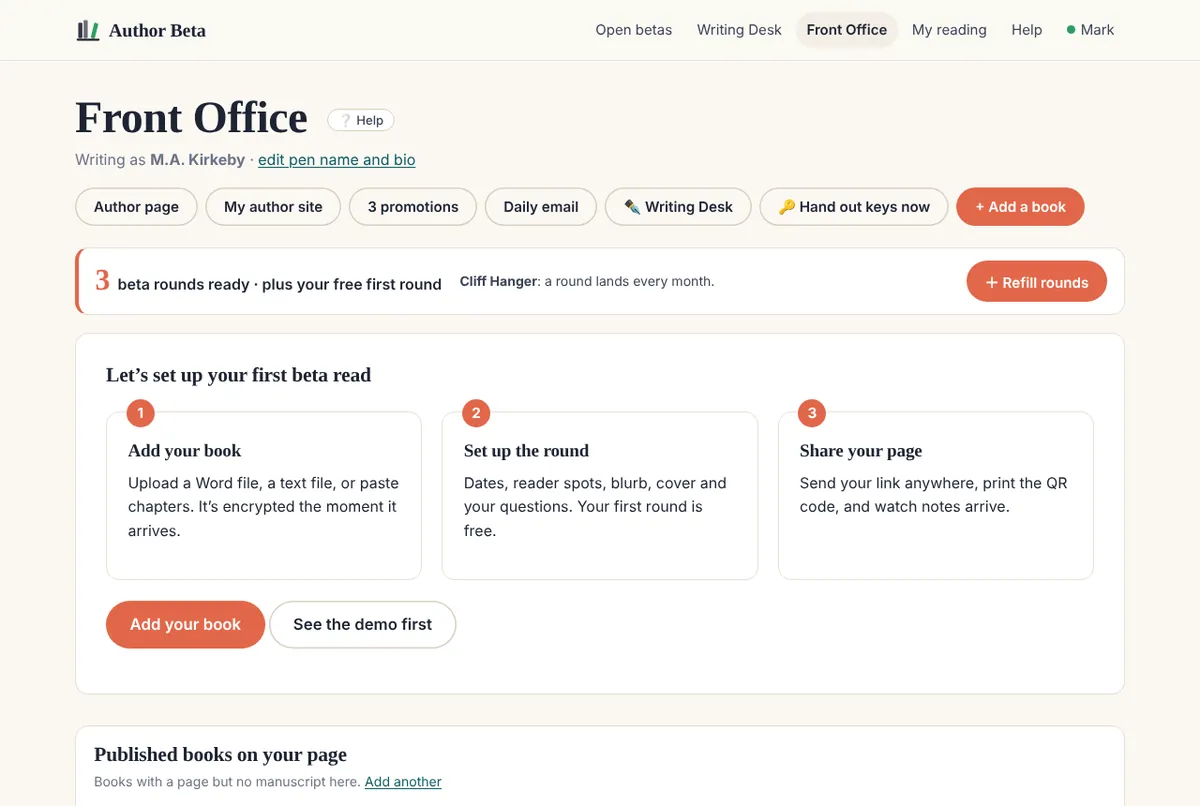
The Dashboard is where your books meet readers. (Writing happens at the Writing Desk.)
- The bar at the top shows how many beta rounds you have ready to use, when your next Cliff Hanger round arrives, and + Refill rounds.
- Shortcuts: your author page, your author site (on a paid plan), promotions, your daily email, the Writing Desk, 🔑 Hand out keys now, and + Add a book.
- Each book with its manuscript and every beta round: status, readers, notes (with how many came in today) and the reading window. Control panel opens a round.
- Published books on your page: books you added for your author page without a manuscript (how).
Related
- Add a book for beta reading · Upload a manuscript in almost any format; it’s encrypted in your browser before it’s sent.
- Set up and open a beta round · The public page, dates, reader spots, who can find and join it, your questions, and opening it.
- Beta rounds and promotions · Your first round is free. After that a round uses one promotion: $5, or less in a pack.
Still stuck, or something here is wrong? Tell us and we’ll fix it.