

Marketing: plan it, write it, post it
Campaigns from ready-made plans, every post and email drafted from your book’s details, and a checklist that shows when a book is ready to promote.
Start with the path
Open Marketing and pick a book. The marketing path is one straight line of steps, from getting the book’s basics right to keeping it selling for years: Get ready, Build your readers, Before launch, Launch week and Keep it selling. Each step says why it matters and what to do, and its button takes you straight to the tool that does it. Steps tick themselves when the site can see they’re done (a Pitch Kit filled in, a launch plan made, four posts planned); for the rest, press I’ve done this or Skip for now. A book that’s already out skips the launch steps.
Below the path is your toolbox: the Pitch Kit, the Post Idea Bank, Templates, Reader Proof, the Social scheduler, campaigns, the calendar and opportunities.
Marketing lives in your Dashboard, and on your own author and book pages (a dark bar only you can see). It helps you plan and write; you post. Nothing goes out under your name unless you send it.
Start a campaign
- Press + New campaign (or Promote this book on a book page).
- Choose a plan: Book launch (six weeks before to two weeks after), Evergreen backlist, Price promotion, Reader magnet, Series read-through, Local and community, Review copies, Newsletter swap or Paid promotion.
- Pick the book and the key date. Every step is dated around it at 9:00 AM your time, and every post and email is drafted from your book’s title, tagline, page and store links.
Drafts never invent praise, star ratings, prices, deadlines or “bestseller” claims. Where a draft says [price] or [a reader’s words], fill it in only with what’s true, and quote readers only with their permission.
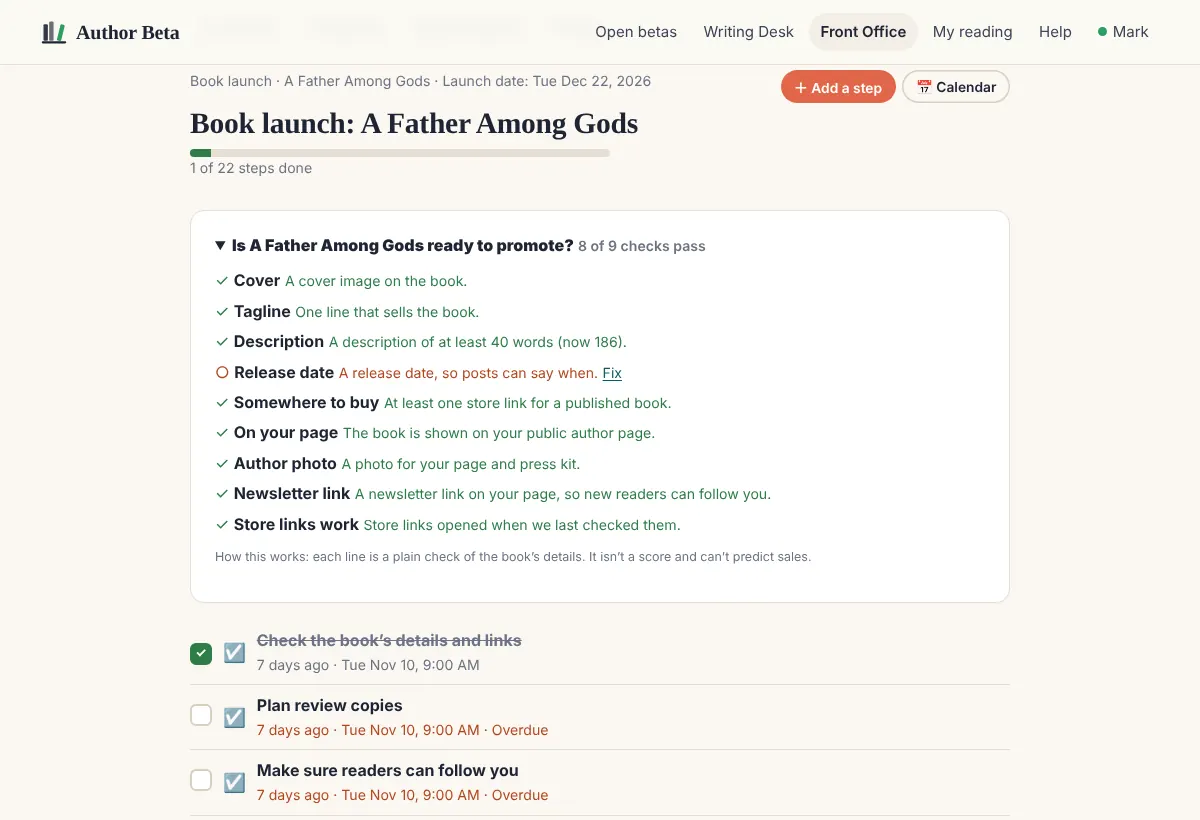
Is the book ready?
Each campaign opens with a plain checklist for its book: cover, tagline, a description of 40 words or more, release date, a store link, the book showing on your page, your photo, a newsletter link, and whether its store links opened when we last checked them. It isn’t a score, and it can’t predict sales.
Write, post, tick
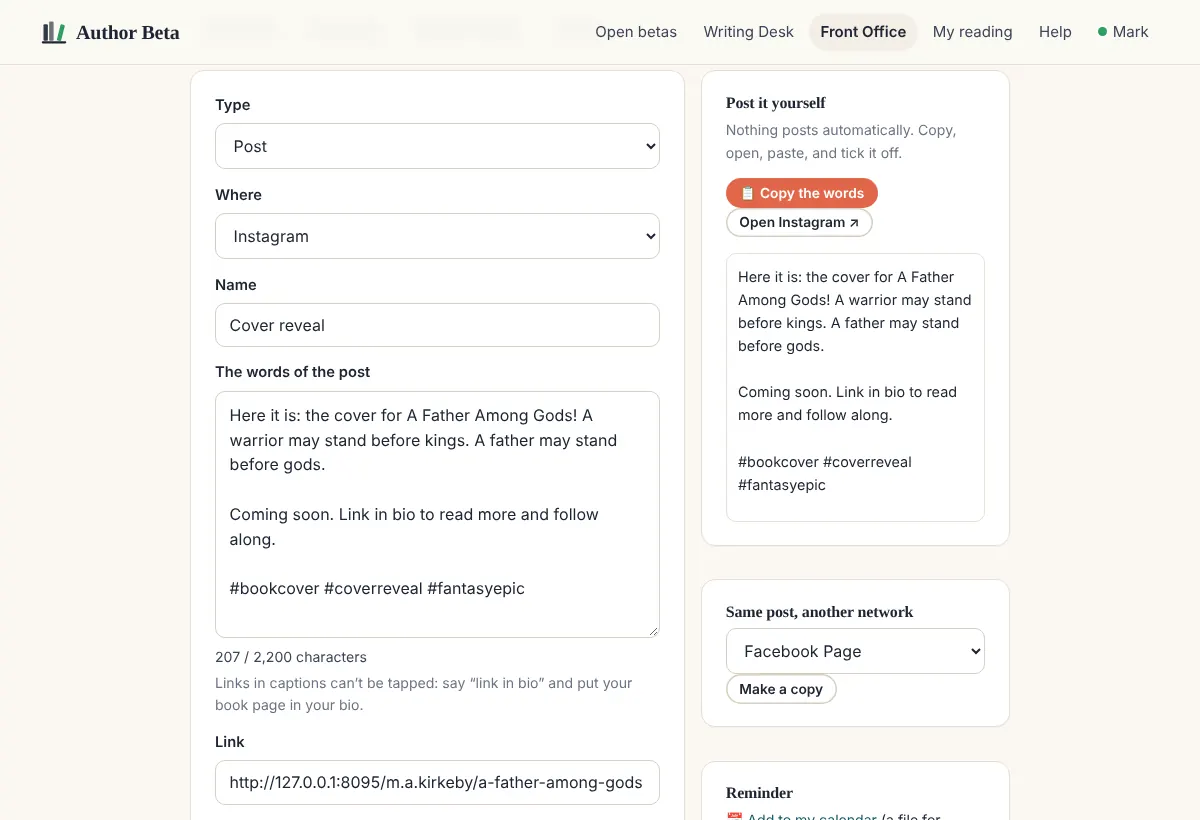
- Open a step. Change the words for that network; the counter shows its length limit, and the notes say what works there (Instagram captions can’t carry tappable links, X counts every link as 23 characters, and so on).
- Add a picture: your book cover, or a social graphic you made in the Cover Studio (it has square, portrait, story, wide and pin sizes, your published covers, and starter messages such as Cover reveal and Out now).
- With Cliff Hanger you can also add a video (MP4). See Videos on posts for where it goes on its own and where you post it yourself.
- Mark it Ready when the exact words, picture and time are right. Changing any of them afterwards puts it back to a draft.
- Press Copy the words, download the picture, Open the network, paste and post. Then tick it done, and add the post’s link if you like.
Same post, another network makes a copy you can shorten or change. Add to my calendar gives any step as a calendar file.
Change the date
If a release date moves, change it on the campaign. You see every step that would move before anything changes; steps you’ve done stay where they are.
Free and Cliff Hanger
Every author can run one launch campaign at a time, with every drafted step and checklist. The Writing Desk adds every plan, 3 at a time. Cliff Hanger adds as many campaigns as you like, the marketing calendar, the opportunity board, store-link checks and picture uploads.
Related
- Pitch Kit: your book in a sentence, a blurb and seven keywords · A guided worksheet for each book: your reader, comparable books, the hook, tropes, the blurb, keywords, pitches and bio. Every draft, idea and template is filled in from it.
- Templates: ready-made designs for authors · Hundreds of designs for every network, ad and banner, plus full book covers with spine and back. Filled in from your book or with sample words; edit any word, download, or open in Cover Studio.
- Social scheduler (free) · Every planned post lined up by day for two weeks: copy the words, download the picture, open the network, tick it posted. Or post automatically through your own free Buffer account, or export to another scheduler.
- Post Idea Bank · Over 100 post ideas filled in with your book: behind the story, characters, setting, tropes, questions for readers, reader proof, launch, deals and fun. One click fills your next two weeks.
- Reader Proof: your beta read as marketing · What your beta readers did with the book: how many finished, the chapters they loved most, reviews you can quote, and your launch team. Only on Author Beta.
- The marketing calendar · Your social month at a glance (one pill per network per day), plus every dated post, email, task and deadline in a month view or list, filtered, and in your own calendar app.
- Opportunities · A checked list of promotion sites, review programmes, group promos and libraries, plus your own private list with deadlines.
Still stuck, or something here is wrong? Tell us and we’ll fix it.