

The look of your page
Themes, 30 ready-made colour sets or your own colours, accent, fonts, a hero colour or image, and section order.
- Theme: Classic (warm paper, any genre), Noir (thrillers, crime, horror), Rose (romance), Parchment (fantasy and historical), Starlight (science fiction) or Minimal (literary and nonfiction). M.A. Kirkeby’s page uses Parchment.
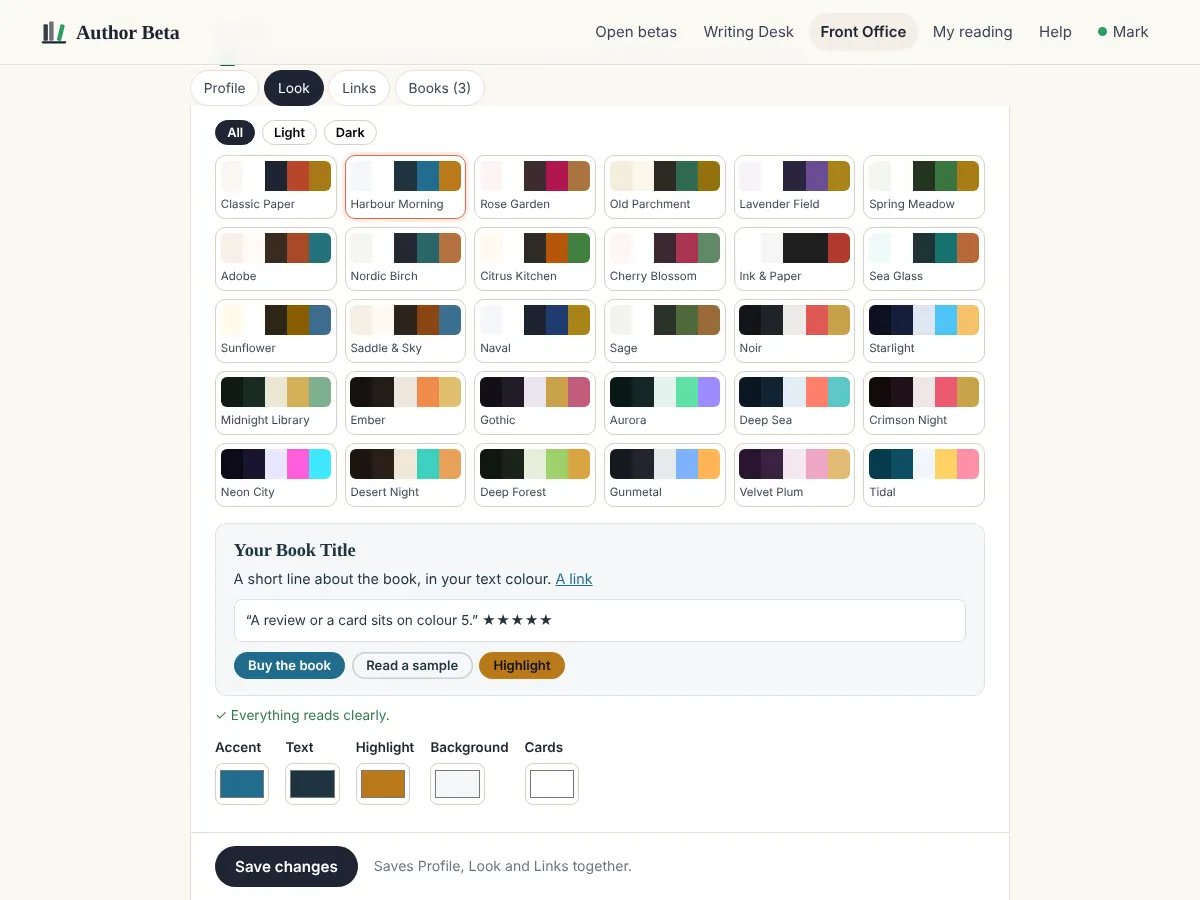
- Colours: keep the theme’s, or tick Use my own colours and pick one of 30 colour sets that work together (16 light, 14 dark: Harbour Morning, Old Parchment, Noir, Starlight, Midnight Library, Neon City and more), then change any of the five colours: accent, text, highlight, background and cards. A live preview shows a title, a link, a review card and buttons, and a plain-words check tells you if anything would be hard to read. The theme keeps its type and style; your colours replace its colours.
- The same five colours are your site colours, so your author page, book pages and author site always match.
- Accent colour for buttons and links, if you want one different from your colour set.
- Fonts: the theme’s own, or Editorial, Elegant, Modern, Literary or Typewriter. All served from our own server, no Google fonts.
- Hero: a background colour or an image behind your name. M.A. Kirkeby’s uses a candle-lit writing desk.
- Sections: reorder or hide the featured review, the books and the full bio.
Want to design every page yourself, section by section? That’s the author site.
Related
- Your free author page · A public home for you and your books at authorbeta.com/your-name, ready in minutes.
- Votre propre site d’auteur · Design every page yourself, section by section. Design free; live with Cliff Hanger.
Still stuck, or something here is wrong? Tell us and we’ll fix it.