

The AI Writing Assistant
Beside your chapter in the Writing Desk: paste or type, preview, send, then insert what you like at your cursor. It can’t open your chapters, and it keeps a private record of everything you insert.
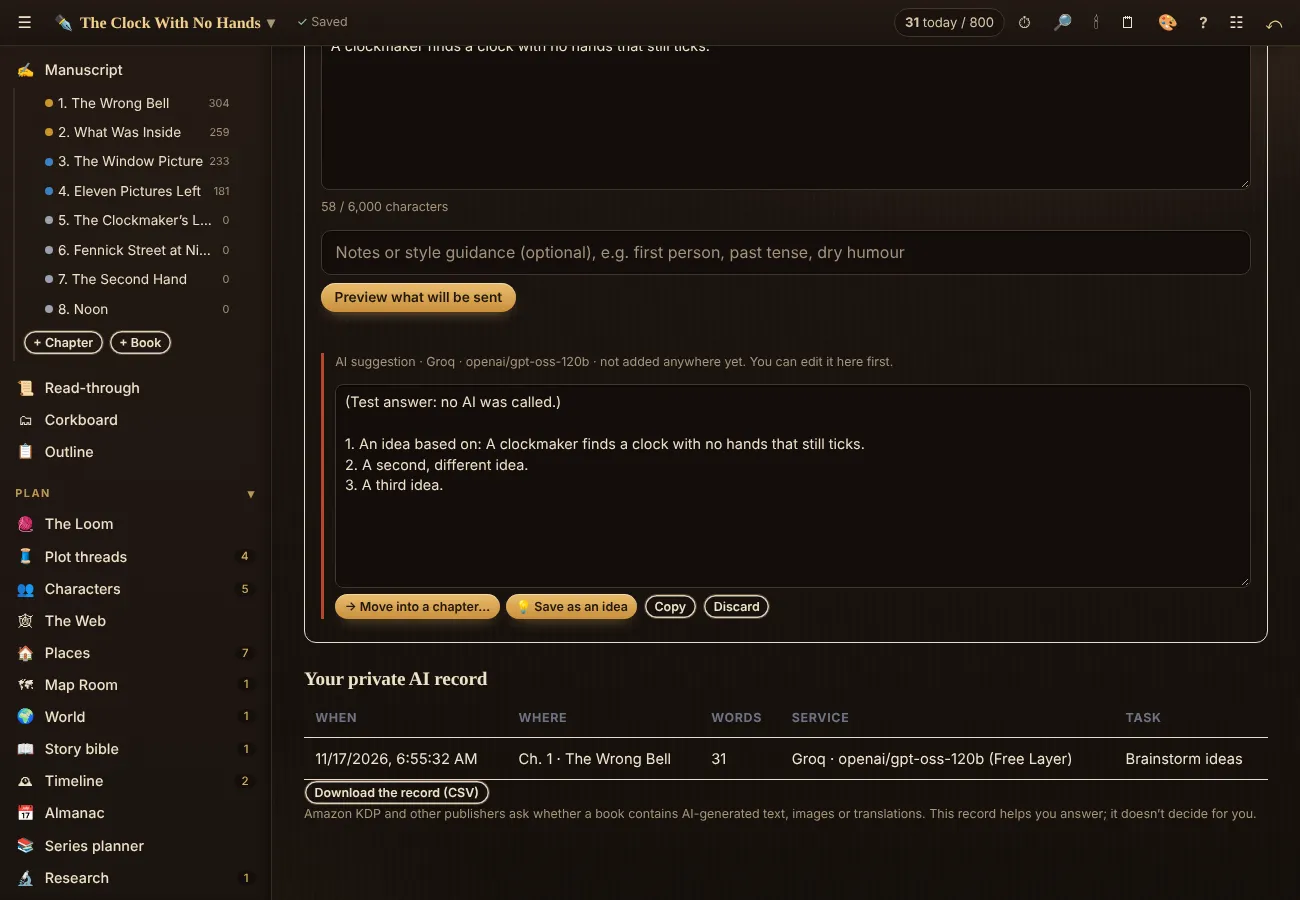
Press ✦ AI in the Writing Desk’s top bar and the assistant opens on the right, beside the chapter you’re writing; it stays open as you move between tools. The full page, with your private AI record, is in the sidebar under ✦ AI Assistant. Either way it has no way to open your chapters, notes or story bible: it works only on what you type or paste into its box.
- Choose Free Layer or My API at the top (see AI Connections).
- Pick a task: Brainstorm ideas, Critique only (no rewriting), Copyedit suggestions, Line-edit alternatives, Draft a short passage, What could happen next?, Describe a place, object or creature, or Summarize.
- Type notes, or send a passage from your chapter: highlight it and press ✦ Send to AI (the button appears beside your highlight, or use ✦→ in the toolbar). It’s copied into the box, where you can see and edit it; nothing is sent yet. Add style notes if you like (“first person, past tense, dry humour”).
- Press Preview what will be sent, check it, tick the box and press Send.
- The answer appears as a suggestion you can edit. Nothing is in your book yet. Then choose where it goes, or nowhere:
- ↘ Insert at my cursor: it goes exactly where your cursor was in the chapter you have open. Click in the chapter first to choose the spot.
- ⇄ Replace my selection: select a passage in your chapter, then press this to put the suggestion in its place.
- → Move into a chapter… adds it at the end of any chapter or scene; 💡 Save as an idea, Copy or Discard.
The 🤖 machine-voice check in the editor’s toolbar can send a paragraph here with Rewrite in my voice chosen; see the machine-voice check.
Your private AI record
Every time you insert or move AI text into your manuscript, the assistant notes where, when, how many words, and which service and model. The record lives inside your encrypted project: only you can see it, and readers never do. Download it as a CSV any time. Amazon KDP and other publishers ask whether a book contains AI-generated text, images or translations; the record helps you answer honestly. It doesn’t decide for you.
Related
- AI Connections: optional AI, your choice · Turn AI on for your account (it’s off until you do), use the Free Layer or your own key, and see what each service does with what you send.
- Full AI: let your own AI follow one book · Your choice, per book, with your own AI account only: the AI panel can read the parts of the book you tick, so it can follow the story. It still only suggests; you approve every word that goes in.
- The machine-voice check · A free check that runs on your computer: stock phrases, flat sentence rhythm and other habits that make prose read as AI-written. Nothing is sent, and no AI is used.
- A IA nunca lê o seu manuscrito · Your manuscript is protected from AI: nothing reads it, nothing trains on it, and no one here can read it. AI tools are optional, yours to choose, and see only what you put in their own box.
- Name Studio · Names for people, places, realms, inns, orders, species, artifacts, ships and worlds: real traditions, invented sounds or your own, with a look-alike warning. No AI.
Still stuck, or something here is wrong? Tell us and we’ll fix it.