

The Press: ePub, Word and print-ready PDF
Compile your book for Kindle and every store, a manuscript for agents, or a paperback or hardcover interior typeset for KDP and Barnes & Noble Press.
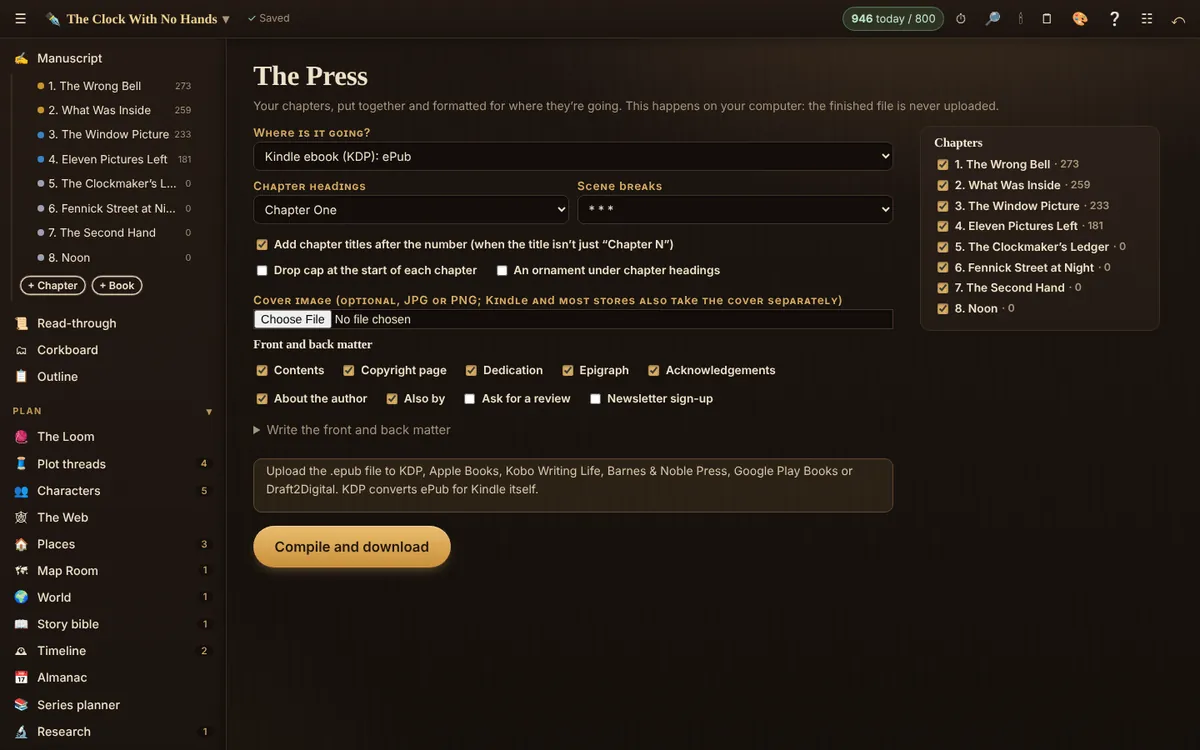
Everything is built in your browser. Choose a format, set the options, and download.
Formater
- ePub 3 for KDP, Apple Books, Kobo Writing Life, Barnes & Noble Press, Google Play Books or Draft2Digital (KDP converts ePub for Kindle itself). Add a cover if you like.
- Word, standard manuscript format: 12 pt, double-spaced, one-inch margins, your name, title and page number at the top of each page, chapters on new pages. What agents and editors expect.
- Word, book layout: laid out at the trim size you choose.
- Print-ready PDF for KDP and Barnes & Noble Press, paperback or hardcover (also IngramSpark). See below.
- Also Markdown, one web page (HTML), plain text and RTF.
Options
Choose where it’s going first (Kindle ebook, print, manuscript and so on), then: chapter headings, chapter titles after the number, drop caps, the scene-break ornament, author and title at the top of pages, chapters on right-hand pages, and which chapters to include. Large-print layouts are among the print choices, and in a series project a box set puts every book in one.
Print: set up once, export perfect files
The Press typesets your book into a real print PDF, here in your browser:
- Exact trim size, one page per sheet, no bleed or crop marks, not encrypted: what both stores ask for.
- Fonts built in and embedded: EB Garamond, Crimson Pro, Libre Baskerville, Lora or Source Serif 4, all licensed for selling books. Your book looks the same on every computer and at the printer. (Why these fonts, and why no uploads.)
- The inside margin is set from your real page count. KDP and B&N Press use the same table: 0.375 in up to 150 pages, 0.5 in to 300, 0.625 in to 500, 0.75 in to 700 (B&N stops at 800 pages, KDP at 828). We add a little more so text never sinks into the spine. If the margin changes the page count, the book is laid out again.
- Whole-paragraph justification with hyphenation, no single lines stranded at the top or foot of a page, chapters that start on a new page (or a right-hand page), blank pages kept blank, running heads and page numbers, contents with the real page numbers, and an even page count.
When it finishes you get a check against each store’s rules (“Ready for KDP paperback”, “Ready for Barnes & Noble Press paperback”), the spine width for cream and white paper, and the page count goes to the Cover Studio. Your settings are saved with the book: change your text, press compile again, and you get the same layout.
At the store, choose the same trim size, black ink and your paper, upload the PDF as the interior, use their previewer, and order a proof copy before you publish.
Front and back matter
Tick what you want: contents, copyright page, dedication, epigraph, acknowledgements, about the author, “Also by”, a request for reviews, a newsletter sign-up, and a sneak peek of your next book’s first chapter. Write the front and back matter opens the text for each.
Compiling comes with the whole desk.
Related
- Spine Rule: paperback cover size · The full cover size, spine width and a printable template for your paperback.
- Query Desk · Query letter, synopsis, blurb, logline, comparable titles and bio, plus a tracker for every submission.
- Send til læsere · Put your chapters in front of beta readers without exporting anything.
Still stuck, or something here is wrong? Tell us and we’ll fix it.