

Send to Readers
Put your chapters in front of beta readers without exporting anything.
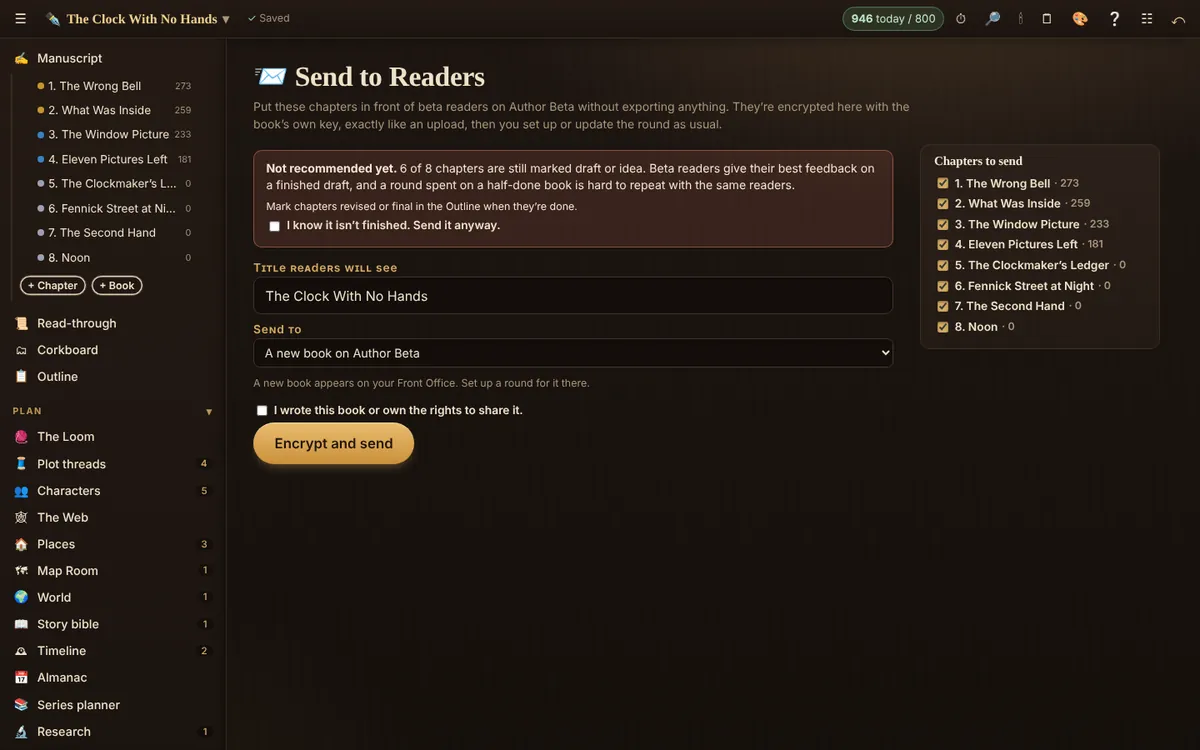
- Open Send to Readers, or choose 📨 Move to beta on a book (in the chapter list’s book menu or the Series planner).
- Check the readiness line. When every chapter is marked revised or final you’ll see ✓ Ready for readers. If some are still drafts, you can tick Send it anyway; it’s your call, but readers give better notes on a finished draft.
- Choose where it goes: a new book (it appears in your Dashboard, where you set up a round), or an existing book to update its text.
- Confirm you own the rights, and send. The chapters are encrypted in your browser with that book’s own key, exactly like an upload.
Updating a book in an open round? Readers see the new text straight away. Their notes stay with the chapter numbers they were made on, so keep chapters in the same order if you can.
Send to Readers comes with the whole desk. On the free desk you can still upload a manuscript from your Dashboard.
Related
- Set up and open a beta round · The public page, dates, reader spots, who can find and join it, your questions, and opening it.
- Outline · Every chapter and scene in a table: status, point of view, place, words and synopsis.
- The Dashboard · Your books, their beta rounds, your promotions and the shortcuts to everything else.
Still stuck, or something here is wrong? Tell us and we’ll fix it.