

The Loom (plot grid) and story structures
Every plot thread against every chapter, plus Blueprints: story structures laid over your chapters.
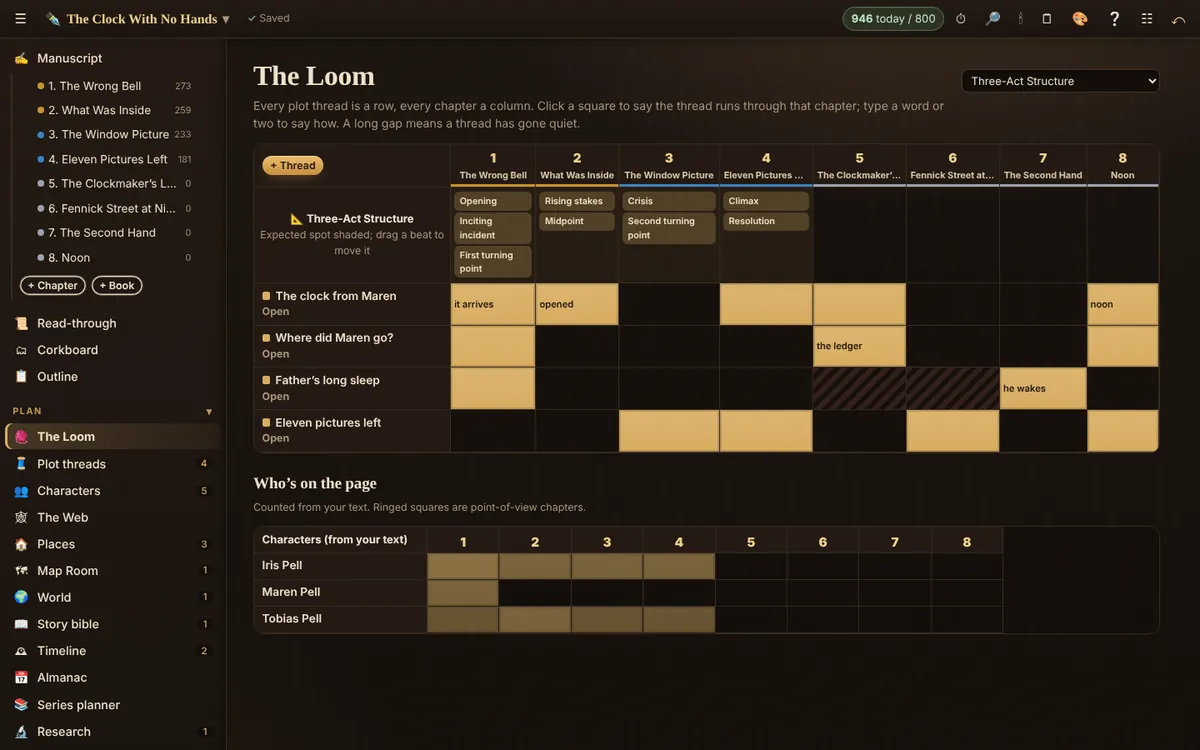
Every plot thread is a row and every chapter a column. It answers one question at a glance: which threads run through which chapters, and where has one gone quiet?
Use it
- Add your threads first (main plot, each subplot, each mystery or promise to the reader). The Loom offers to add one if you have none.
- Click a square to say the thread runs through that chapter. Type a word or two to say how (“the oath is tested”).
- A long gap is shaded: that thread has gone quiet. Sometimes that’s right; often it’s a subplot readers will miss.
- Ringed squares are point-of-view chapters, counted from your text.
Blueprints: story structures
Choose a Blueprint to lay a structure over your chapters: Three-Act Structure, Fifteen Beats, Hero’s Journey, Romance Beats, Mystery, Seven-Point Structure or Four Movements (kishōtenketsu). Each beat appears where it’s expected, shaded by your book’s length. Drag a beat to the chapter where it really happens; empty beats stand out.
Related
- Plot threads · Track subplots, mysteries and set-ups, the chapters they run through, and whether they paid off.
- Corkboard · Your chapters as index cards: drag to reorder, write a synopsis on each card.
- Disposition · Every chapter and scene in a table: status, point of view, place, words and synopsis.
Still stuck, or something here is wrong? Tell us and we’ll fix it.